Cybergrooming on Roblox: How to Protect Your Child from Online Dangers
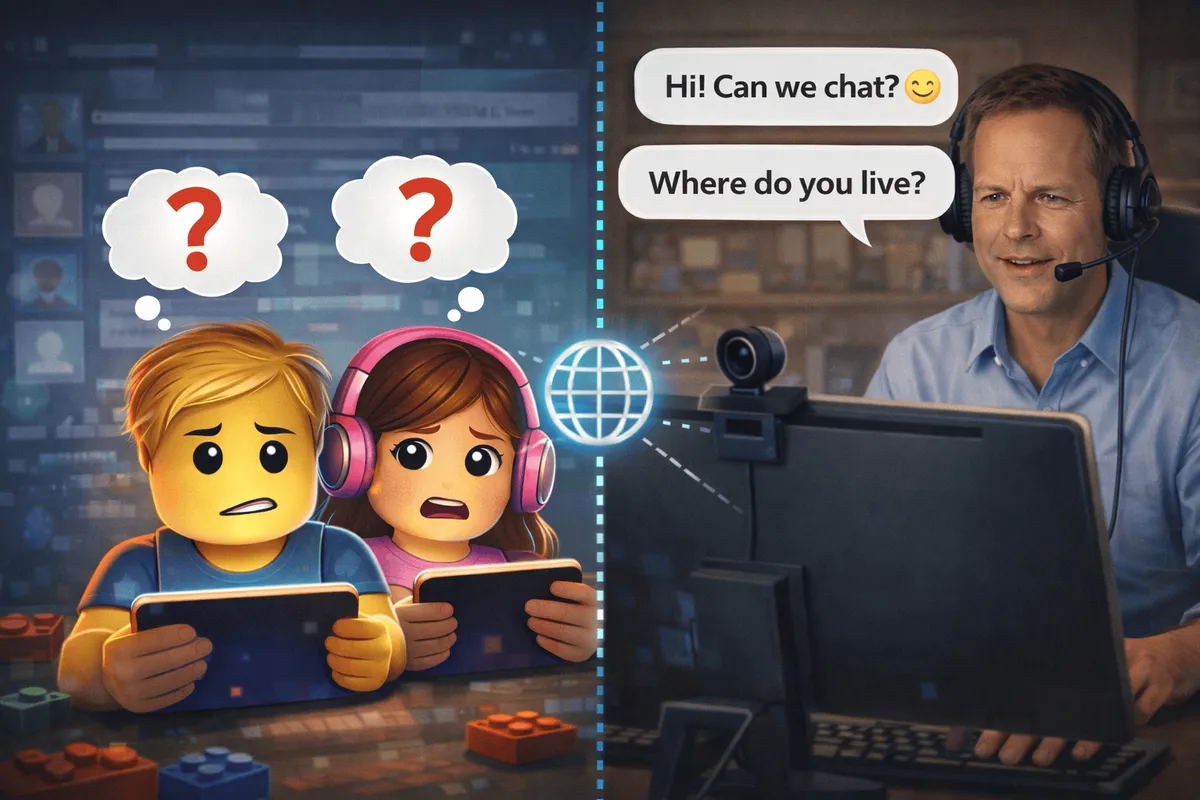
Roblox is a fantastic platform for creativity and fun – but like all online platforms with social interaction, there are risks parents should be aware of. Cybergrooming is one of the more serious issues that can unfortunately occur on Roblox. This guide explains what cybergrooming is, how predators operate, and how you can effectively protect your child.
What is Cybergrooming?
Cybergrooming refers to the process where adults deliberately establish contact with minors online – with the goal of gaining their trust to later sexually abuse or exploit them. The term “grooming” means preparing or cultivating someone for a specific purpose.
Key Facts
| Aspect | Information |
|---|---|
| Legal Status | Criminal offense in most countries |
| Age Group | Most vulnerable: 9-14 years old |
| Platforms | Social networks, online games, chat apps |
| Duration | Grooming process can take weeks to months |
| Gender | Both girls and boys are affected |
Why is Roblox a Potential Target?
Roblox is attractive to predators for several reasons:
- Large Child User Base: Over 50% of users are under 13 years old
- Anonymous Communication: Chat features enable private contact
- Trust Building Through Play: Playing together creates closeness
- Gift-Giving Possible: Robux and items can serve as “bait”
- Limited Parental Oversight: Children often play unsupervised
How Do Predators Operate? The Phases of Cybergrooming
Phase 1: Initial Contact
Predators actively seek potential victims. On Roblox, this often happens through:
- Random Game Encounters in popular games
- Friend Requests to children with few friends
- Compliments about the avatar or gameplay
- Offers to Help with difficult game sections
Typical First Messages:
- “Wow, your avatar looks so cool!”
- “You play really well, want to join my team?”
- “I can help you get more Robux”
Phase 2: Building Trust
In this phase, the predator tries to establish an emotional bond:
- Pretending Shared Interests
- Showing Understanding for problems (school, family)
- Posing as a Peer or as a “cool” older friend
- Regular Contact at specific times
- Small Gifts like Robux or Game Passes
Phase 3: Isolation
The predator attempts to isolate the child from their environment:
- Demanding Secrecy (“This stays between us”)
- Suggesting Exclusivity (“You’re my best friend”)
- Turning Against Parents (“They don’t understand you”)
- Moving to Other Platforms (Discord, WhatsApp)
Phase 4: Boundary Crossing
Boundaries are gradually pushed:
- Personal Questions (name, school, address)
- Asking About Appearance or requesting photos
- Sexualized Conversations or content
- Suggesting Meetings
Recognizing Warning Signs
Behavioral Changes in Children
Watch for these signs:
| Warning Sign | Possible Meaning |
|---|---|
| Secrecy | Hides screen, becomes nervous when asked |
| Time Patterns | Plays at unusual hours, especially at night |
| Gifts | Suddenly has Robux or items without explanation |
| Mood Swings | Withdrawal, anxiety, aggression |
| New “Friends” | Talks about older online friends |
| Other Platforms | Downloads new apps (Discord, Snapchat) |
Warning Signs in Communication
These phrases should raise alarms:
- “You can’t tell anyone about this”
- “Your parents wouldn’t understand”
- “I’ll send you something, but don’t tell anyone”
- “How old are you really?”
- “Do you have a webcam?”
- “We should meet up sometime”
Protective Measures on Roblox
Technical Settings
Roblox offers extensive safety features you should use:
Enable Account Restrictions
- Log into your child’s account
- Go to Settings (gear icon)
- Select Security
- Enable Account Restrictions
This setting:
- Limits access to pre-filtered games
- Blocks all chats
- Prevents messages from strangers
Restrict Communication
Under Settings > Privacy:
| Setting | Recommendation for Children Under 10 |
|---|---|
| Who can message me? | No one / Friends |
| Who can send me friend requests? | Friends of Friends |
| Who can follow me into games? | Friends |
| Who can invite me to games? | Friends |
Set Up PIN Protection
Set up a PIN so settings can’t be changed without your knowledge:
- Settings > Security
- Enable Account PIN
- Set a four-digit PIN
- PIN required for all security changes
Communication with Your Child
Technical measures alone aren’t enough. The most important tool is open communication:
Age-Appropriate Education
This video from “Nummer gegen Kummer” (a German child helpline) explains cybergrooming in a child-friendly way (German language):
For Younger Children (6-9 years):
- “Some people on the internet aren’t honest about who they are”
- “Never tell anyone your real name or where you live”
- “If someone asks something that feels weird, tell me about it”
For Older Children (10-13 years):
- Explain the concept of cybergrooming in age-appropriate terms
- Discuss specific examples of manipulative messages
- Emphasize: “You can always tell me everything without getting in trouble”
Regular Conversations
- Ask about new online friends
- Show interest in your child’s games
- Play together to understand the platform
- Explain why certain rules are important
Rules for Children
Every child should know these rules:
-
Don’t Share Personal Information
- Real name
- School
- Address
- Phone number
- Photos
-
Don’t Accept Gifts
- No Robux from strangers
- No Game Passes as gifts
-
Don’t Keep Secrets
- “Good” adults never ask for secrets from parents
-
Trust Your Gut Feeling
- If something feels wrong, it probably is
-
Get Help Immediately
- Tell parents right away about uncomfortable messages
What to Do If You Suspect Something
Immediate Actions
If you have suspicions:
- Stay Calm – Don’t blame or accuse the child
- Talk – Gently ask about online contacts
- Preserve Evidence – Take screenshots of chats and profiles
- Secure Account – Change password, block contact
- Seek Professional Help – Contact police and counseling services
Properly Preserving Evidence
| What to Save? | How? |
|---|---|
| Chat Logs | Screenshots with date/time |
| Predator’s Profile | Screenshot of entire profile |
| Friends List | Screenshot before changes |
| Gifts/Items | List with timestamps |
| Other Platforms | Preserve evidence there too |
Where to Get Help
In the United States:
| Resource | Contact |
|---|---|
| National Center for Missing & Exploited Children | CyberTipline.org or 1-800-843-5678 |
| FBI | tips.fbi.gov |
| Internet Crimes Against Children Task Force | ICAC regional offices |
| Crisis Text Line | Text HOME to 741741 |
| Childhelp National Child Abuse Hotline | 1-800-422-4453 |
In the United Kingdom:
| Resource | Contact |
|---|---|
| CEOP (Child Exploitation Online Protection) | ceop.police.uk |
| NSPCC | 0808 800 5000 |
| Childline | 0800 1111 |
Report to Roblox:
- Open the offender’s profile
- Click the three-dot menu
- Select “Report Abuse”
- Choose the reason and provide details
- Roblox investigates within 24-48 hours
Talking to Your Child
After an incident:
- No Blame – The child is the victim, not the perpetrator
- Praise for Telling – They did the right thing
- Professional Help – Therapeutic support if needed
- Allow Normalcy – Don’t ban all online activity
Prevention for Gaming Enthusiasts
For Older Players and Teenagers
Even if you’re not a child, you can contribute to safety:
- Stay Alert – Report suspicious behavior
- Support Younger Players – Be a role model in the community
- Don’t Participate – No personal questions to younger players
- Respect Boundaries – No private channel contact with much younger users
As a Community Member
- Inform Moderators when suspicious
- Support Affected Players without applying pressure
- Share and Support prevention efforts
Roblox’s Own Safety Measures
What Roblox Does
Roblox invests heavily in safety:
- AI-Based Chat Filters detect suspicious patterns
- 24/7 Moderation by humans and algorithms
- Automatic Age Verification for certain content
- Strict Policies against grooming behavior
- Cooperation with law enforcement agencies
Limitations of Platform Safety
Despite all measures:
- Filters can be bypassed (typos, code words)
- Predators move to external platforms
- Skilled manipulation isn’t always detected
- Parental oversight remains essential
Frequently Asked Questions (FAQ)
Is cybergrooming a common problem on Roblox?
Due to its large, young user base, Roblox is a potential target for predators. The platform invests significantly in safety measures and regularly reports incidents to authorities. Exact numbers aren't public, but any case is one too many. With proper settings and open communication, the risk can be significantly minimized.
At what age should I talk to my child about cybergrooming?
As soon as a child becomes active online, age-appropriate conversations about online safety should begin. For children under 8, simple rules suffice ("Don't share your real name"). From ages 8-10, the topic of cybergrooming can be explained in child-friendly terms. Most importantly, children should know they can always talk to you without getting in trouble.
My child received Robux from a stranger. What should I do?
First, have a calm conversation without accusations. Ask who the Robux came from and whether there was further contact. Block the contact and preserve evidence (screenshots). If the exchange seems harmless, use it as a learning opportunity about the dangers of online gifts. If you suspect grooming behavior, contact the police.
Can I see who my child is chatting with on Roblox?
Roblox doesn't provide direct insight into chat logs for parents. However, you can: check the friends list, restrict communication to "Friends" or "No one," and play together regularly. Trust and open conversations are more effective than secret monitoring – children should know they can come to you with problems.
Should I ban my child from Roblox?
A complete ban is usually unnecessary and can be counterproductive. With proper safety settings, clear rules, and open communication, Roblox can be used safely. More important than bans is helping your child become media-literate and know how to protect themselves online – skills they'll need on other platforms too.
What's the difference between cybergrooming and cyberbullying?
Cybergrooming is the deliberate targeting of minors by adults with sexual intent. Cyberbullying refers to repeated harassment, threatening, or humiliation of individuals through digital channels. Both are serious problems but require different prevention and response strategies.
How can I tell if someone on Roblox is lying about their age?
Direct age detection is difficult, but warning signs may include: playing at "adult" hours, having unusually mature knowledge, asking inappropriate questions, wanting to move to other platforms, offering gifts, or behavior that doesn't match the stated age. Teach your child to be cautious when things don't add up.
Conclusion: Protection Through Knowledge and Communication
Cybergrooming is a real danger that parents should take seriously – but not a reason for panic. With the right measures, your child can enjoy Roblox safely:
Checklist for Parents
- Safety settings activated in Roblox account
- PIN protection set up for settings changes
- Communication restricted to “Friends” or “No one”
- Age-appropriate conversation about online safety held
- Clear rules for personal information established
- Trusting atmosphere created (“You can tell me anything”)
- Regular conversations about online activities scheduled
- Emergency contacts and resources known
For Gaming Enthusiasts
The Roblox community has a responsibility to its youngest members. Stay alert, report suspicious behavior, and contribute to a safe environment.
The Most Important Thing
The best protection is a child who:
- Knows what cybergrooming is
- Recognizes warning signs
- Trusts their parents
- Knows they’ll always get help
Roblox can be a wonderful place for creativity, fun, and social connections – if we work together to keep it safe.
This article is regularly updated. Last update: January 2026
More Helpful Articles:
Which Roblox Games Are Child-Friendly? The 10 Best Games for Kids 2026
The best child-friendly Roblox games at a glance: From Adopt Me! to Grow a Garden. Which games are safe for kids? A guide for parents and young players.
Roblox 2025 Recap: The Ultimate Update for Players and Parents
How big Roblox became in 2025, what changed around chat and safety, and why the creator economy matters more than ever for kids, teens, players, and parents.
Roblox Chat 2026: The New Age-Based Chat System Explained
Since January 2026, all Roblox users must verify their age to use chat. Learn how the new system works and what it means for your child.
Secure Your Roblox Account: The Best Protection Checklist for Players and Parents
Protect your Roblox account the right way: 2FA, PIN, privacy settings, phishing protection, and device security in a clear, step-by-step guide.
Which Roblox Games Are Child-Friendly? The 10 Best Games for Kids 2026
The best child-friendly Roblox games at a glance: From Adopt Me! to Grow a Garden. Which games are safe for kids? A guide for parents and young players.
Roblox 2025 Recap: The Ultimate Update for Players and Parents
How big Roblox became in 2025, what changed around chat and safety, and why the creator economy matters more than ever for kids, teens, players, and parents.
Roblox Version 711: What Changed (Explained Simply)
A clear, non-technical guide to Roblox Release 711: UI upgrades, avatar/creator updates, and what players and families may notice.
What Is Brainrot? Parent Guide to Roblox, Italian Brainrot, and German Brainrot
Simple parent guide: what brainrot means, key meme characters, language variants, and the most common brainrot themes in Roblox.
Roblox Version 710: What Changed (Explained Simply)
A simple guide to Roblox Release 710: key creator-facing changes, practical bug fixes, and what players and families may notice.
Roblox Version 709: What Changed (Explained Simply)
A simple guide to Roblox Release 709: what changed for creators, what players might notice, and why most updates are happening behind the scenes.
Roblox Chat 2026: The New Age-Based Chat System Explained
Since January 2026, all Roblox users must verify their age to use chat. Learn how the new system works and what it means for your child.

Roblox Version 708: Key Changes Explained for Families and Players
A clear guide to Roblox Release 708: what changed, what parents should know, and what kids and teens will actually notice while playing.
What Is Roblox Studio? A Quick Overview for Kids, Teens, and Parents
A compact introduction to Roblox Studio: what kids and teens can do with it, and what parents should know before they start.
Secure Your Roblox Account: The Best Protection Checklist for Players and Parents
Protect your Roblox account the right way: 2FA, PIN, privacy settings, phishing protection, and device security in a clear, step-by-step guide.
What is Roblox? The Complete Guide for Parents and Players 2026
Everything about Roblox: What is the platform, how does it work, is it safe for kids? The complete guide with tips for parents and players.